

Optimism and Unichain Savings: Withdrawal Guide
What changed
Spark Savings on Optimism and Unichain was wound down as part of the planned deprecation of the Spark Liquidity Layer on both networks. The change was announced and voted on in advance through Spark governance:
- November 9, 2026. The deprecation of both networks was publicly proposed through Spark governance. The original proposals are available on atlas.degov.ai.
- November 12, 2026. Governance voting concluded.
- November 19–21, 2026. Spark provided additional USDC liquidity on Optimism so that users could withdraw before the change.
- November 23, 2026. The governance spell was executed.
Since the spell, direct withdrawals into USDC are no longer available on Optimism or Unichain, and deposits are disabled. The Spark App supports an alternative withdrawal route: convert your sUSDC 1:1 into sUSDS, then bridge your sUSDS to Ethereum. See the Spark Savings risk architecture for the risks that apply to Spark Savings.
What is affected: sUSDC and sUSDS Savings on Optimism and Unichain only.
What is not affected: Spark Savings on Base and Arbitrum is not affected by this change, nor are Spark Savings vaults on Ethereum or other networks.
How to withdraw
The withdrawal route has two parts:
- Redeem your sUSDC for sUSDS directly in the Spark App (sUSDS holders skip this step).
- Bridge your sUSDS to Ethereum mainnet using Superbridge, a third-party interface to the OP Stack native bridge.
Bridging takes about 7 days. While it is being bridged, sUSDS continues to accrue the Sky Savings Rate, which is variable and set by Sky Governance.
A. If you hold sUSDC
- Go to the Savings page at app.spark.finance and connect your wallet on Optimism or Unichain.
- Open the USDC Savings vault page. It shows Withdrawal only and the note "This Savings Account is in withdrawal-only mode. New deposits are disabled." Only the Withdraw button is shown; Deposit and Send are hidden.
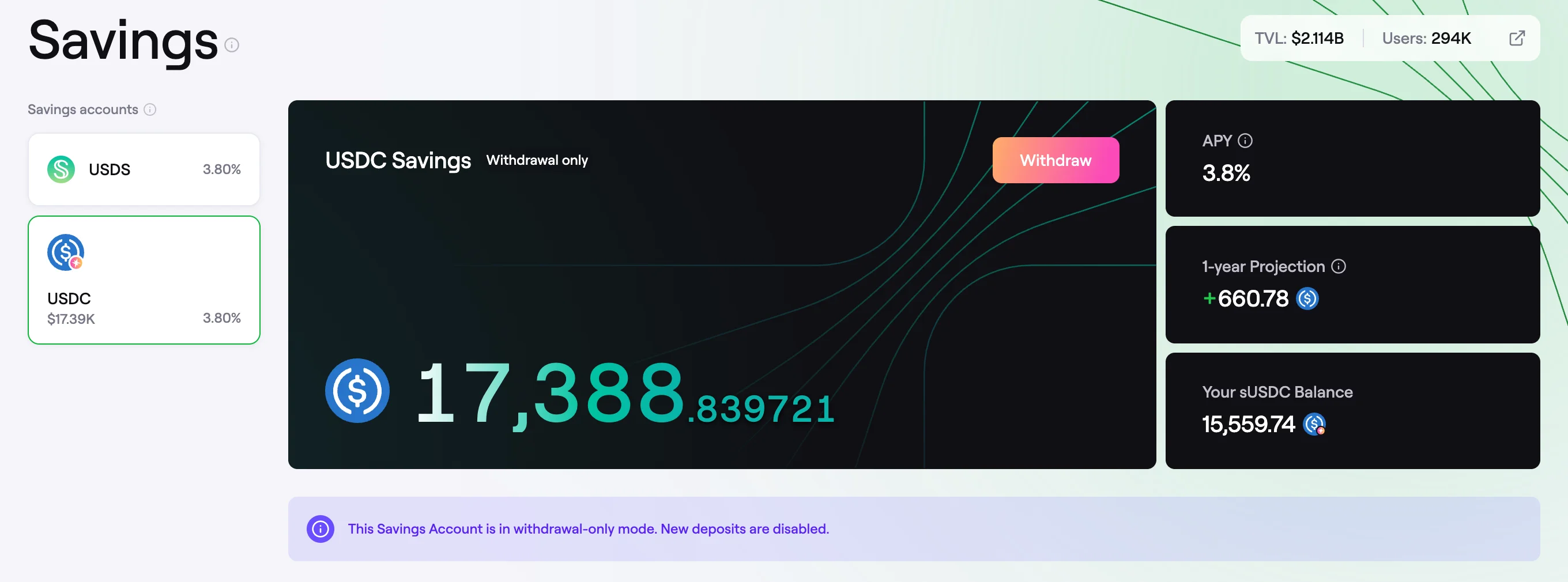 USDC Savings vault page on Optimism in withdrawal-only mode
-
Click Withdraw. A dialog titled Withdraw from USDC Savings opens. It shows this note (Optimism example):
The sUSDC savings vault on Optimism is being deprecated, so withdrawals are no longer available on this chain. To withdraw, bridge your sUSDS to Ethereum and withdraw there. Your sUSDC will first be converted to sUSDS 1:1.
Bridging takes about 7 days and needs two more transactions on Ethereum, so you will need some ETH there for gas. Superbridge guides you through each step.
-
Review the Transaction overview. It has two rows:
- Convert, for example
15,559.74 sUSDC → 15,559.74 sUSDS - Bridge, for example
15,559.74 sUSDS to Ethereum
Your full balance is used. There is no amount input.
- Convert, for example
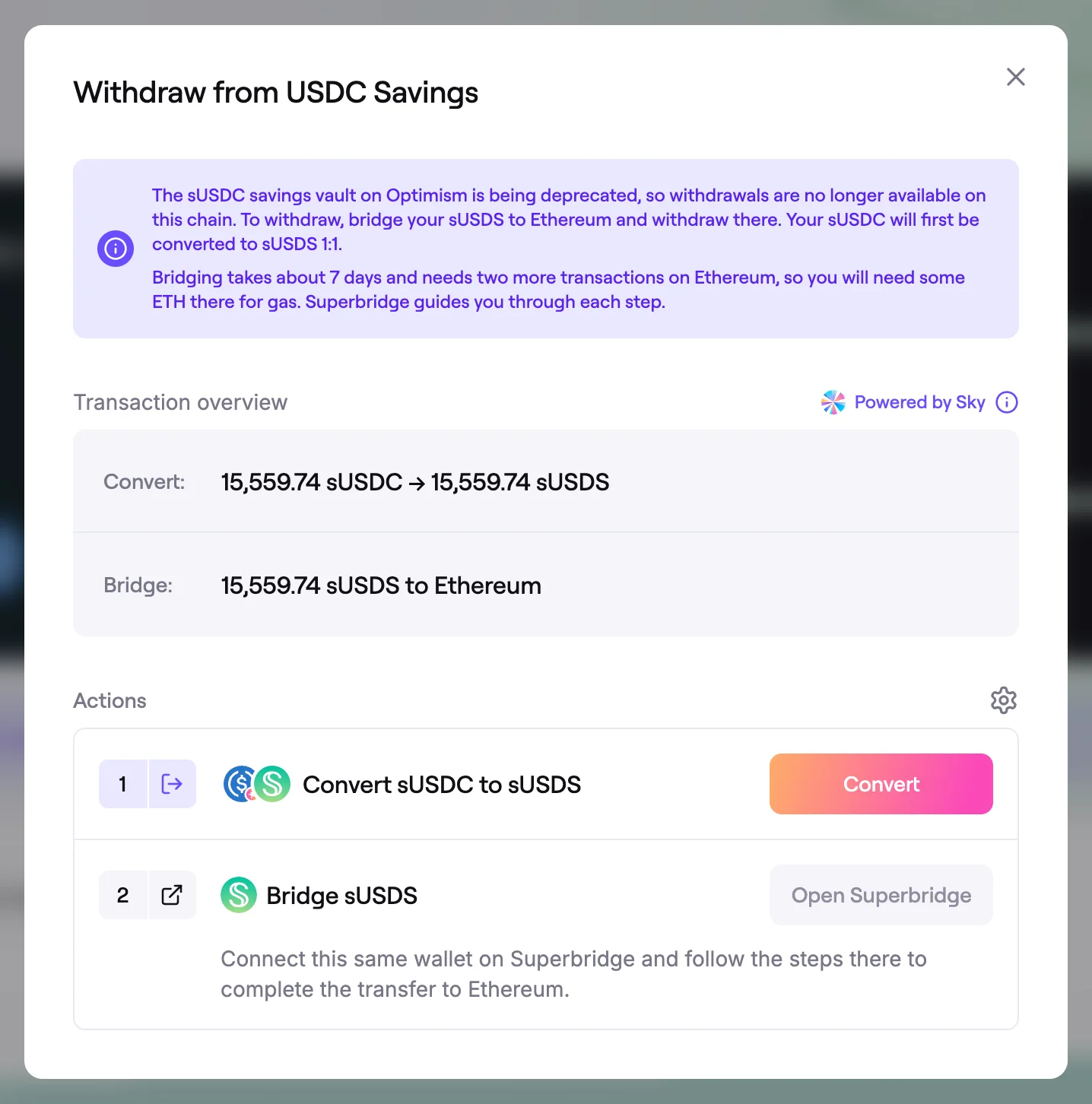 Withdraw dialog for sUSDC: convert, then bridge
-
In the first step, Convert sUSDC to sUSDS, click Convert and confirm the transaction in your wallet. Your sUSDC is converted to sUSDS 1:1.
-
Once the conversion is confirmed, the second step, Bridge sUSDS, becomes active. Click Open Superbridge. Superbridge opens in a new tab with sUSDS preselected. As the dialog says: "Connect this same wallet on Superbridge and follow the steps there to complete the transfer to Ethereum." Continue with C. On Superbridge.
B. If you hold sUSDS
sUSDS holders skip the convert step.
- Go to the Savings page at app.spark.finance and connect your wallet on Optimism or Unichain.
- Open the USDS Savings vault page and click Withdraw. A dialog titled Withdraw from USDS Savings opens, with a single Bridge row in the transaction overview.
- In the Bridge sUSDS step, click Open Superbridge. Superbridge opens in a new tab. Continue with C. On Superbridge.
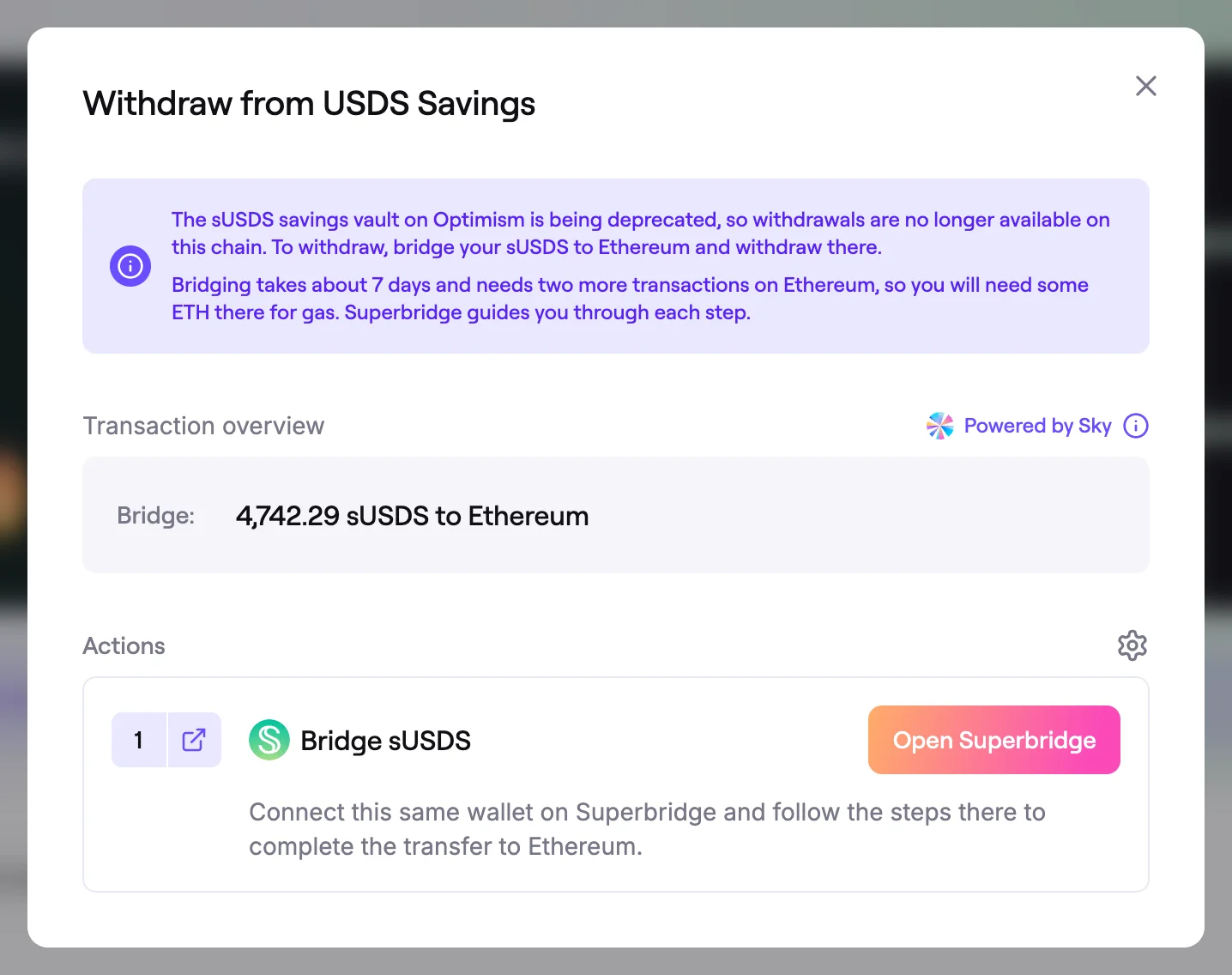 Withdraw dialog for sUSDS: bridge only
You can also open Superbridge directly with sUSDS preselected:
C. On Superbridge
Superbridge walks you through each step and shows when the next one is ready. Follow its prompts:
- Connect the same wallet you use in the Spark App.
- Start the bridge on Optimism or Unichain: approve sUSDS, then start the transfer.
- Prove the withdrawal on Ethereum, about 2 hours later.
- Finalize the withdrawal on Ethereum, about 7 days after proving.
Prove and finalize are transactions on Ethereum and need ETH for gas. You can close Superbridge between steps; to continue, open superbridge.app with the same wallet and check Activity.
D. On Ethereum
Once the finalize transaction is confirmed, your sUSDS is in your wallet on Ethereum. You can:
- Keep holding sUSDS, which accrues the Sky Savings Rate (variable, set by Sky Governance), or
- Withdraw it in the Spark App on Ethereum. See Withdraw Savings.
Token addresses
| Network | Token | Address |
|---|---|---|
| Optimism | sUSDC | 0xCF9326e24EBfFBEF22ce1050007A43A3c0B6DB55 |
| Optimism | sUSDS | 0xb5B2dc7fd34C249F4be7fB1fCea07950784229e0 |
| Unichain | sUSDC | 0x14d9143BEcC348920b68D123687045db49a016C6 |
| Unichain | sUSDS | 0xA06b10Db9F390990364A3984C04FaDf1c13691b5 |
| Ethereum | sUSDS | 0xa3931d71877C0E7a3148CB7Eb4463524FEc27fbD |