

Borrowing Assets
Once you have supplied collateral to a market, you can borrow that market's loan asset against it. If you have not supplied collateral yet, follow Supplying Collateral first.
Tutorial
-
Open the market and make sure your wallet is connected and you have supplied collateral.
-
Click Borrow — either in the My Wallet panel on the Details tab, or in the loan row of the My position tab.
-
The Borrow dialog opens with the market's loan asset preselected.
- Amount — enter how much you want to borrow. The dialog shows the amount Available to borrow, which is limited by both your collateral (via the market's Max LTV) and the market's liquidity.
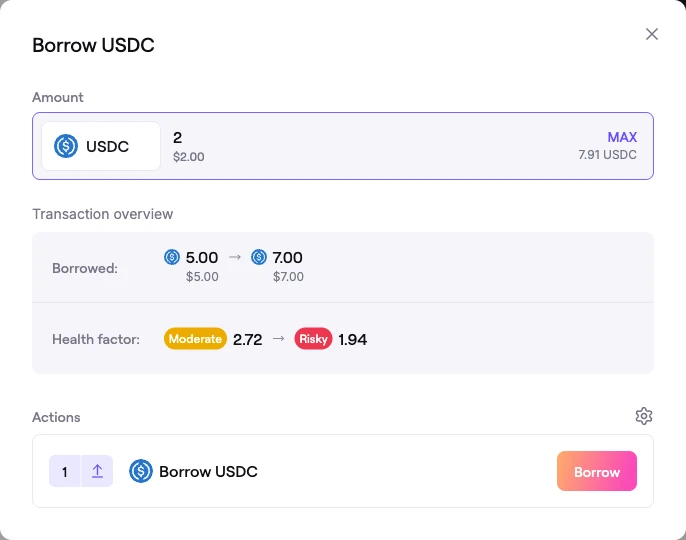 Borrow dialog
-
The Transaction overview shows your Borrowed balance updating and the resulting Health factor. Keep the Health Factor comfortably above 1 to reduce liquidation risk.
-
The Actions section lists the transactions to sign. In the simplest case this is a single Borrow action.
-
Once the actions complete, the borrowed asset arrives in your wallet and your position updates.
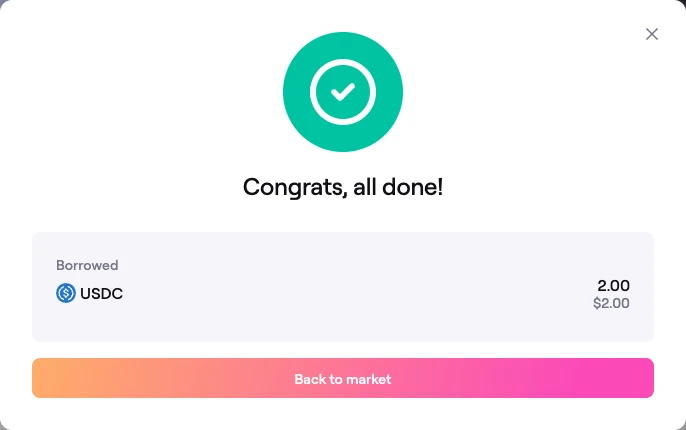 Confirmation: assets borrowed
To borrow more later, repeat the process. To reduce your debt, see Repaying Your Loan.
Borrowing more than the market's idle liquidity
Isolated markets often run at high utilization, meaning little of the loan asset is sitting idle in the market at any moment. When your borrow is larger than the market's directly available Market Liquidity, the app can source the shortfall on demand from other Morpho markets through the Public Allocator — all in the same borrow transaction.
When this happens, the Borrow dialog:
- Adds an extra Authorize step (a one-time authorization of the Morpho bundler) followed by a combined Reallocate & Borrow action instead of a plain borrow.
- Shows a reallocation fee acknowledgement. Sourcing liquidity this way may charge a fee set by the vault curators, paid from your wallet on top of network gas. You must tick I acknowledge the reallocation fee to proceed.
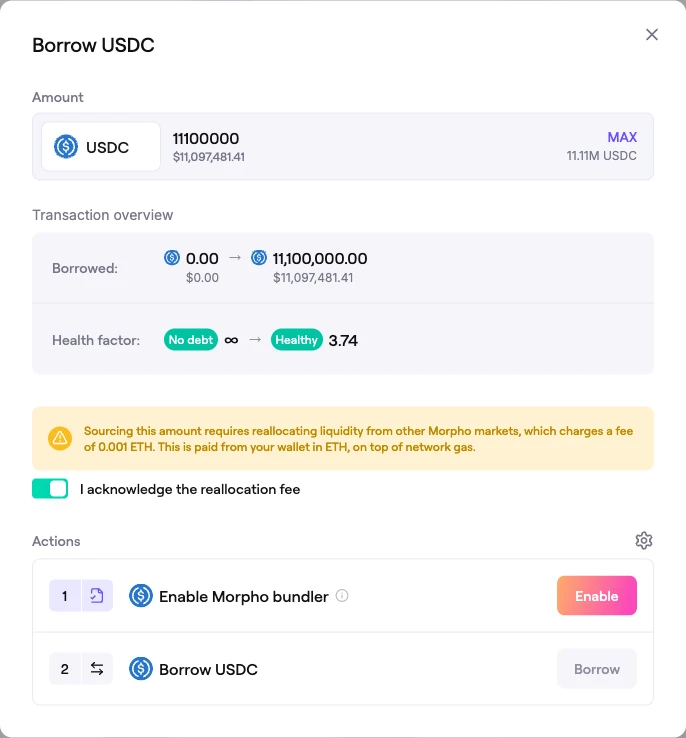 Borrowing above idle liquidity: the reallocation fee acknowledgement and Reallocate & Borrow action
This is what lets a market offer large borrows even when most of its own supply is already lent out. For the full explanation of how liquidity is composed and reallocated, see Liquidity & the Public Allocator.
FAQ
Why borrow instead of selling my collateral?
Borrowing lets you access liquidity while keeping exposure to your collateral asset, rather than selling it. Many users borrow to leverage their holdings or to free up capital for other opportunities.
How much can I borrow?
Your limit is the lower of two things: what your collateral allows at the market's Max LTV, and the market's available liquidity (including liquidity reachable through the Public Allocator). The Available figure in the Borrow dialog already accounts for both.
What asset do I repay?
You repay in the same loan asset you borrowed, plus accrued interest. See Repaying Your Loan.
When do I need to repay?
There is no fixed term. As long as your Health Factor stays above 1 you can keep the position open, but interest accrues over time and gradually lowers your Health Factor, so monitor it.
What is the reallocation fee?
When a borrow pulls liquidity from other Morpho markets via the Public Allocator, vault curators may charge a fee for that reallocation. The exact amount is shown in the Borrow dialog and must be acknowledged before you confirm. See Liquidity & the Public Allocator.